
Client
Internal product
Case study
ProtoGogh is the space between an idea and a build: structured enough to make a direction real, flexible enough to explore alternatives, and clear enough for a client to review without joining the editor.
Client
Internal product
Role
Product architecture, editor workflows, responsive design systems
Year
2026
Summary
Built a website prototyping workspace for creating page directions, editing responsive blocks, comparing variants, and sharing controlled previews with clients.
Website projects lose time when a team tries to discuss a direction that only exists as a moodboard, a rough wireframe, or a half-built page. The people making the decision need something concrete enough to react to, but the team does not want to commit to production implementation before the structure is understood.
ProtoGogh was built to make that middle step useful. A user can create a project, shape a page from structured blocks, compare variants, inspect different device views, and share a controlled preview with a client. The product is not a replacement for a production CMS. It is a workspace for turning an idea into a decision-ready prototype.
The product surface positions ProtoGogh as a focused workspace for making a website direction concrete before development.
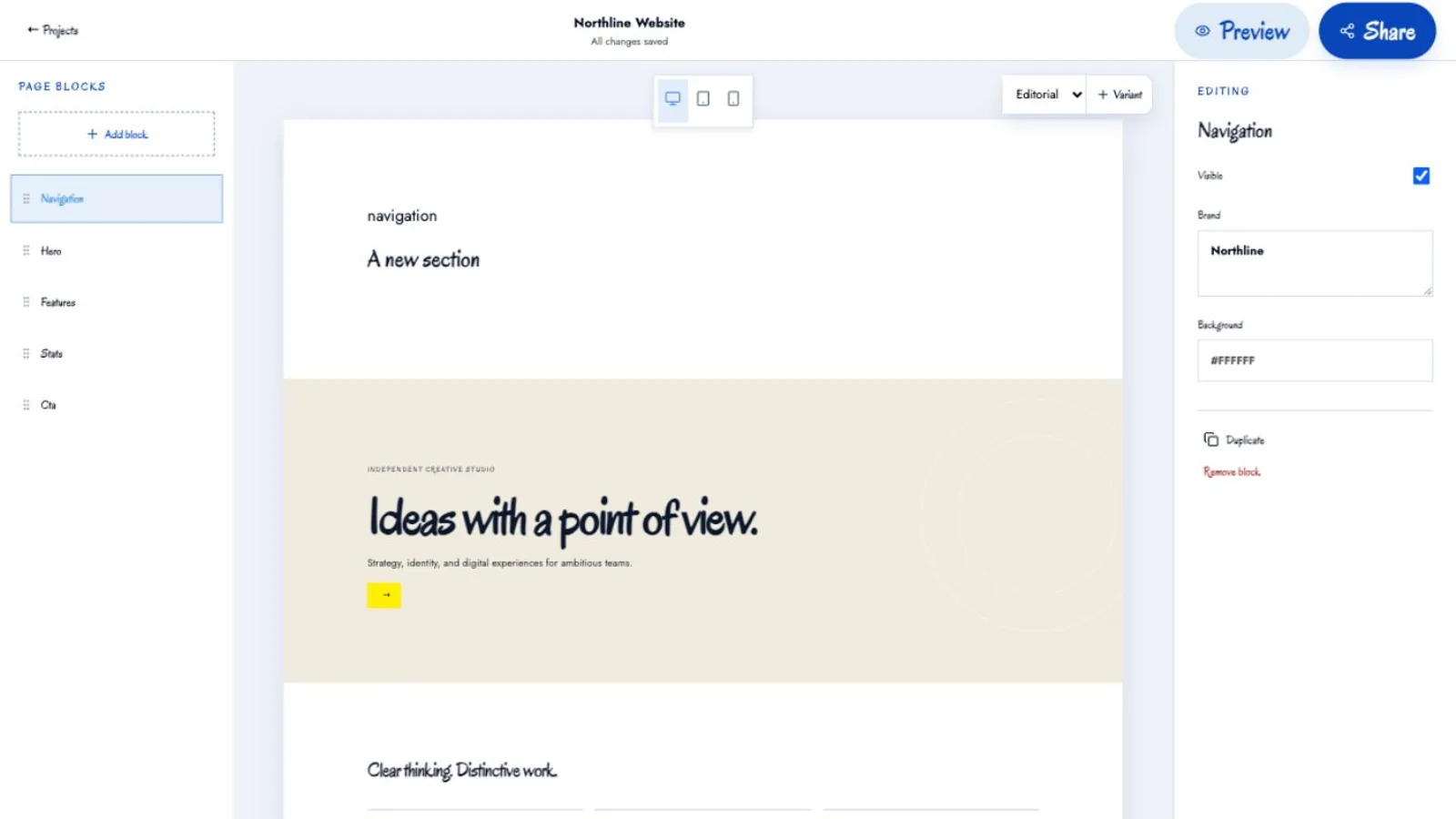
The editor combines page blocks, navigation, variants, and device views so the direction can be explored in context.
Client sharing exposes the selected direction without requiring every reviewer to work inside the editing interface.
The editor is organized around page structure rather than a blank canvas. Blocks give a direction recognizable parts: navigation, hero content, features, stats, calls to action, and supporting sections. Those parts can be rearranged and edited without asking a client to interpret implementation details.
This structure also makes the prototype easier to reason about later. A page is not just a screenshot; it has a navigation model, content hierarchy, and responsive behavior. That means a change can be discussed as “the hero variant needs a clearer action” or “the feature section should move earlier,” rather than as a pixel-by-pixel negotiation about a flattened image.
A single page direction is rarely enough. ProtoGogh supports organized variants so a team can compare alternatives without duplicating an entire project by hand. A variant can test a different hero, hierarchy, or content emphasis while keeping the broader page model intact. That makes exploration cheaper and the decision trail easier to follow.
Device views are equally important. A direction that looks convincing on a desktop artboard can become crowded at tablet width or fail to communicate on a phone. The editor includes desktop, tablet, and mobile views so responsive behavior is part of the conversation before the handoff. It is not a complete production QA pass, but it catches the category of disagreement that otherwise appears after development has already started.
The client-facing view is deliberately different from the editing workspace. A reviewer needs to see the direction, navigate the relevant pages, and understand which option is under discussion. They do not need access to every draft control, project setting, or internal workflow.
Controlled sharing creates a cleaner review loop. The team can prepare a direction, send a link, collect reactions against a stable view, and keep working on the project without turning every client comment into an accidental edit. That separation is useful for agencies and internal teams alike because it distinguishes collaboration from permission to change the underlying project.
ProtoGogh treats project and workspace management as first-class product behavior. Projects can remain separate, which matters when one team is working across several clients or brands. Workspace settings, members, billing, and project assets belong to the product that owns them; DeveloGogh can provide suite-level identity and entitlement without taking over the prototype data itself.
That independent model keeps the editor focused. ProtoGogh does not need to become a general-purpose project management suite to be useful. It needs to help a team create a direction, compare it, and share it with the right people.
ProtoGogh turns the ambiguous middle of a website project into a visible workflow. Structured blocks make page ideas editable. Variants make alternatives comparable. Device views surface responsive tradeoffs early. Client sharing makes review controlled. Independent projects and workspaces keep ownership clear.
The result is a prototype that does more than look polished. It gives a team something concrete to discuss and a cleaner bridge from a decision to the eventual build.
Related writing
AI product quality depends on the full interface around the model: inputs, controls, evidence, state, review paths, and recovery behavior.
Fast delivery only lasts when teams keep change cheap and refuse to let temporary shortcuts harden into architecture.
The best AI workflows know when to pause for clarification, approval, or missing context instead of forcing a confident action from uncertain inputs.
Relevant services
Custom app builds and integration work for teams that need systems to talk cleanly across HubSpot, internal tooling, and the rest of the stack.
Builds and refactors for the parts of a platform that determine whether launches stay fast, reliable, and maintainable.